The Ultimate Guide to WordPress Localization in the Baltics (+ FREE Lithuanian Pack)
If you run an e-commerce store in Lithuania, Latvia, or Estonia, you know that trust is everything.
Your brand can be brilliant, your products top-quality, but if a customer lands on a half-English checkout page, that trust evaporates in an instant. An unprofessional, poorly translated website is the fastest way to lose a sale.
You have invested in powerful premium tools like Elementor Pro, WooCommerce extensions, or booking systems. You expect a professional experience, but you are left with critical parts of your site stuck in English.
“Add to cart”, “View wishlist”, “Your account” — these are not just words. They are the final, crucial steps in your customer’s journey.
The Problem: Why Are Your Premium Plugins Not Translated?
The WordPress community does a fantastic job translating the core software. But when it comes to Premium (Pro) plugins, you are often left on your own. Developers focus on major global languages (Spanish, German, French), leaving smaller but vital markets like ours behind.
This creates a broken user experience, damages your brand’s credibility, and directly hurts your conversion rates.
The Solution: Take Control with Loco Translate
The best tool for taking control of your website’s language is a free plugin called Loco Translate. It allows you to scan any plugin for translatable text and create your own language files directly within your WordPress dashboard.
But there is a problem…
Even this powerful translation tool isn’t fully translated into Lithuanian out of the box. It’s a perfect example of the very problem we aim to solve.
🎁 START HERE: A FREE, 100% Professional Lithuanian Pack
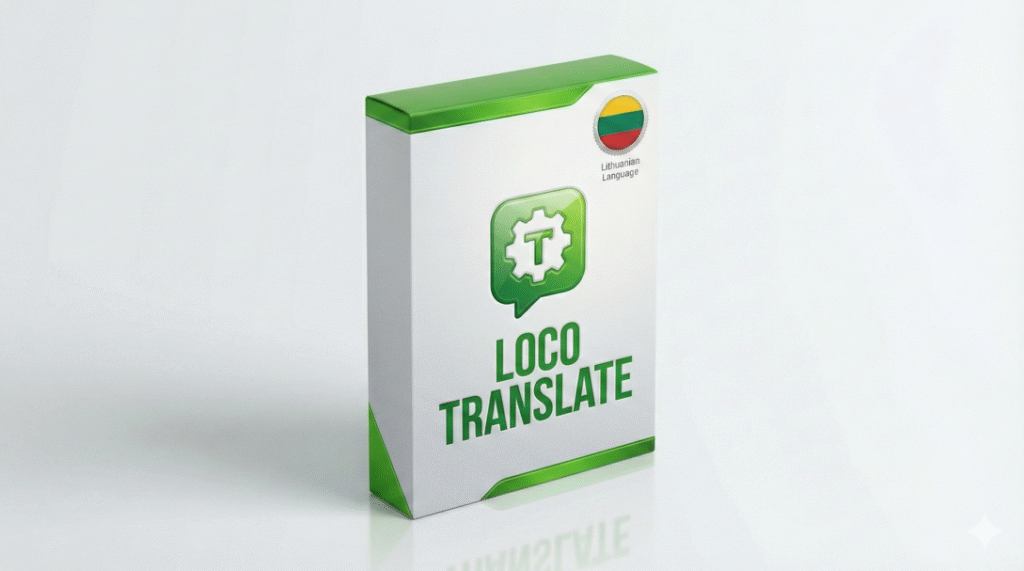
To demonstrate the difference professional localization makes, I have done the heavy lifting for you. I created a complete, 100% professionally translated Lithuanian language pack for the Loco Translate plugin.
This isn’t a quick, machine-generated file. It is verified by an engineer, includes all technical strings, and is ready to upload.
Instant download via our shop. No credit card required.
Method 1: How to Translate Plugins Yourself (The Hard Way)
Once you have your fully Lithuanian Loco Translate installed, you can start translating other plugins manually. The process looks like this:
- Navigate to Loco Translate in your dashboard.
- Select a Plugin (e.g., “Elementor Pro”).
- Click New Language and choose “Lithuanian”.
- CRITICAL STEP: Always select the “Custom” location path. If you don’t, your work will be deleted when the plugin updates.
- Start translating. Click, type, save. Repeat 3,000 times.
The “Hidden” JavaScript Problem
After hours of work, you might notice that some parts (like Popups or dynamic Forms) are still in English. Why?
Modern plugins like Elementor or Astra use JavaScript (.json) files for translation. Standard manual translation often misses these. You end up with a site that is 90% translated, but the most interactive parts remain broken.
Method 2: The Engineering Way (Save 50+ Hours)
Your time as a business owner is too valuable to be spent on thousands of lines of code. It should be invested in marketing and sales.
That is why Baltic Localize was born.
I provide professional, engineering-grade localization packs for the most popular Premium plugins. My packs are built using a hybrid system of AI efficiency and manual engineering review.
✅ With Baltic Localize packs, you get:
- Instant Results: Go from a mixed-language site to a fully professional store in minutes.
- Technical Completeness: I include
.po,.mo, AND.jsonfiles. This ensures dynamic JavaScript elements are translated. - Updates: Packs are compatible with the latest 2025 plugin versions.
- Context-Aware: I distinguish between technical terms (e.g., “Order” as in Sort vs. “Order” as in Purchase).
Get Premium
The Problem: Why Your Premium Plugins Aren't Translated
The WordPress community does a fantastic job translating the core software and thousands of free plugins. But when it comes to premium (Pro) plugins, you’re often left on your own. Developers understandably focus on major global languages, leaving smaller but vital markets like Lithuanian, Latvian, and Estonian behind.
This isn’t just an inconvenience. It’s a critical business problem that leads to a broken user experience, damages your brand’s credibility, and directly hurts your sales.
The Solution: Take Full Control with Loco Translate
The best tool for taking control of your website’s language is a powerful and free plugin called Loco Translate. It allows you to scan any plugin for translatable text and create your own language files directly within your WordPress dashboard.
It’s the key to unlocking 100% control over every word on your site.
But there’s a small irony: even this powerful translation tool isn’t fully translated into Lithuanian out of the box. It’s a perfect example of the very problem we aim to solve.
And that’s where we step in.
Your Head Start: A FREE, 100% Professional Lithuanian Pack for Loco Translate
To demonstrate the immense difference professional localization makes, we’ve done the heavy lifting for you. We have created a complete, 100% professionally translated Lithuanian language pack for the Loco Translate plugin.
This isn’t a quick, machine-generated file. It’s a meticulous, 100% accurate localization pack, including all technical strings and necessary files (.po, .mo, and .l10n.php). It’s ready to upload.
Get your free pack now and instantly transform your translation workflow into a fully native Lithuanian experience.
Start with the Right Tools – For Free!
Don’t rely on generic translations. Grab our professional Loco Translate Lithuanian Pack absolutely free. No hidden forms here – just add it to your cart in our official store and get the instant download link.
How to Translate Your First Plugin (The Hard Way)
Once you have your fully Lithuanian Loco Translate installed, you can start translating other plugins. The process is straightforward:
Navigate to Loco Translate in your WordPress dashboard.
Select a Plugin (e.g., “Elementor Pro”).
Add a New Language and choose “Lithuanian”.
IMPORTANT: When choosing a location, always select the “Custom” path. This protects your hard work from being deleted during plugin updates.
Start Translating. You’ll see a list of all English strings. You click, you translate, you save. You click, you translate, you save.
And then you look at the progress bar. You’ve spent an hour and translated 50 out of 2,561 strings.
This is the exact moment you realize that while you can do it all yourself, your time as a business owner is far too valuable to be spent on thousands of lines of tedious, mind-numbing work.
The Smart Way: Professional, Ready-to-Use Localization Packs
Your time is your most valuable asset. It should be invested in marketing, product development, and customer service—not lost in translation files.
That’s why Baltic Localize was born.
We provide professional, complete, and continuously updated localization packs for the most popular premium WordPress and WooCommerce plugins. Our packs are built using a sophisticated hybrid system of AI-powered translation and expert human review, ensuring technical accuracy, perfect grammar, and natural-sounding language.
With our packs, you get:
Instant Results: Go from a half-finished site to a fully professional local store in minutes, not weeks.
A Complete Technical Solution: We provide the full package (.po, .mo, and .l10n.php files) to ensure every part of the plugin, including dynamic JavaScript popups and messages, is 100% translated.
Freedom and Full Control: You always get the source .po file. This means you can easily edit any term to perfectly match your brand’s unique voice. No locked-in solutions, ever.
Peace of Mind: All our packs are kept up-to-date with the latest plugin versions.
Stop wasting time on problems we have already solved. Start building a professional business that your customers will trust.
Browse Our Catalog of Ready-to-Use Translation Packs